Download our Free App, Leopp!

Leopp for Google Chrome

Tuesday, October 27, 2009

Most Used Abbreviations in English

English Abbreviations

When you start living in an English speaking country you realize that abbreviations are very common, at the beginning it seems a bit weird as in other languages they are not that common, but then you see their potential because they save a fairly amount of time.

Next is shown a list with the most used abbreviations in English. These abbreviations are sorted alphabetically and presented in a table with three columns: the actual abbreviation, its meaning in English and an example to see the context where it’s used.

Table 1: English Abbreviations
Abrev.MeaningExample of use
AFAIKAs Far As I KnowAFAIK there is no problem at all
AKAAlso Known AsShe’s Victoria Beckham, also known as Posh
ASAPAs Soon As PossibleThis needs to be done asap
BBLBe Back LaterNow you have to wait, he’ll BBL
BRBBe Right BackOne sec, I’ll BRB
BTWBy The WayThat’s really good news. BTW, she also finishes her studies
COBClose Of BusinessWe need to finish this requirement by COB
DIYDo It YourselfIf you want anything to happen you have to DIY!
FYIFor Your InformationCommonly used in the emails and when you forward a message to another person. FYI, original message
IDKI Don’t KnowI’m sorry, IDK
IMOIn My OpinionIMO, you’re wrong
LOLLots Of LaughsLol, that was really funny
NIMNot In the MoodI’m NIM to go out tonight
NPNo ProblemNo problem at all, it was my pleasure
OMGOh My GodOMG! Isn’t that Cristiano Ronaldo?
TBATo Be AnnouncedPrize for the winner is TBA!
TBCTo Be ConfirmedThat is still TBC
TBDTo Be DefinedThe room is yet TBD
UFOUnidentified Flying ObjectHe believes he saw an UFO last night
VIPVery Important PersonThat’s the VIP area for the club
WTFWhat the f**k?WTF are you talking about man?

Do you know any other that is not mentioned above?

read-more

Thursday, October 22, 2009

Halloween is coming…

Halloween

But, what is Halloween exactly?
Halloween (also spelled Hallowe'en) is an annual holiday celebrated on October 31. This holiday has origins in the ancient Gaelic festival known as Samhain (pronounced sow-in or sau-an), which is derived from Old Irish and means roughly "summer's end".

The celebration has some elements of a festival of the dead. The ancient Gaels believed that the border between this world and the Otherworld became thin on Samhain, allowing spirits (both harmless and harmful) to pass through.

Why do children say "trick or treat"?
Trick-or-treating is a customary celebration for children on Halloween. Children go in costume from house to house, asking for treats such as candy or sometimes money, with the question, "Trick or treat?" The word "trick" refers to a (mostly idle) threat to perform mischief on the homeowners or their property if no treat is given. In some parts of Ireland and Scotland children still go guising. In this custom the child performs some sort of show, i.e. sings a song or tells a ghost story, in order to earn their treats.

To finish, some recommended videos from YouTube:

Classic video from Disney with the Donald Duck – Trick or Treat:


Link to video1 in YouTube

This is Halloween, the song from the Nightmare before Christmas movie:


Link to video2 in YouTube

The previous song with subtitles in English:


Link to video3 in YouTube

Happy Halloween!

References:
Information on the Wikipedia
Image in the post
read-more

Wednesday, October 14, 2009

Think in English, turn your email into English!

There are many ways for keeping your English alive, some of them require dedication or time consuming tasks but you can also do small things that can help you to keep in touch with the language. For instance, as simple as setting up your PC desktop's environment to English will make you think in English, so every time you copy a file, set a new device, install an application or turn your computer off you'll be interacting with your system...in English!

You can also change the language of your applications so every time you use your browser, copy-and-paste something or write a document in your word processor you'll be doing it in English. This also applies to sites where language settings can be changed, like Hotmail, Yahoo or Gmail. As an example, let's see how to set up your Gmail account in English.

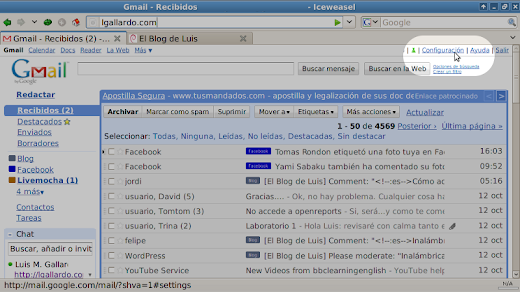
1. Go to Gmail and click on “Configuración”:

Configuration

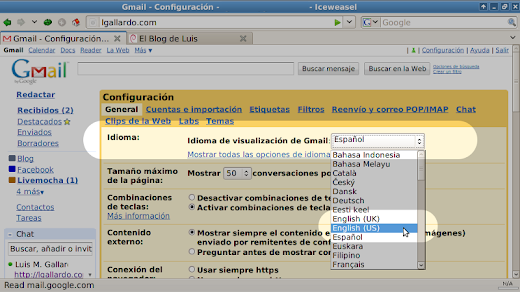
2. On “Idioma” select English (US) or English (UK):

Language

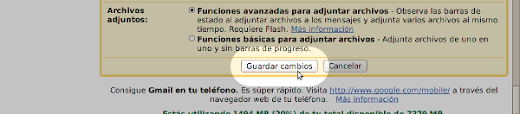
3. Save your settings clicking on “Guardar los cambios”:

Save changes

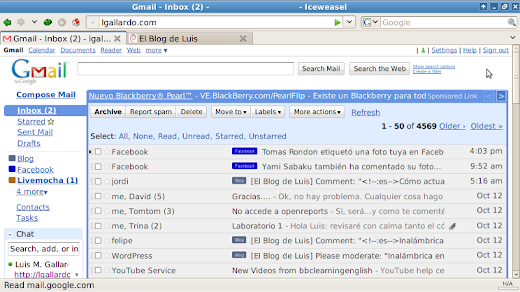
4. Now, your Gmail account is in English!

Gmail set to English

At the beginning it could be a little tough because you might be used to how things are written in Spanish, but after a while you'll find yourself working as you would do it with your PC set in Spanish.

You can even extend this idea to your cell phone, so every time you write a SMS or make a call, you'll be using what you've learned in English!!

Guest post from Luis M. Gallardo, you can visit his blog about Linux, Programming, Videogames and many other topics. Luis also collaborates in the planeta consolas blog.
read-more

Saturday, October 10, 2009

Great video - Mr Duncan Channel Promo

Mister Duncan

There is no doubt that Mister Duncan is one of the best online English teachers; his videos are very creative and educational.

We’d like to share with you one of the latest videos that he has made (in order to promote his free channel on YouTube) that is simply wonderful.

In this video Mister Duncan shows off his big creativity and through a rhyme introduces you to his channel for learning English on YouTube:


Link to the video on YouTube

Every video in his channel is subtitled so it’s easier to understand them.

Don’t miss his channel on YouTube
read-more

Monday, September 28, 2009

Help! I can’t find a word in the English dictionary!

Guide for an efficient search

There are occasions when we look for a word in the English dictionary and we don’t find it. There are several reasons for this: the dictionary hasn’t been updated, the dictionary is based on British English but the word belongs to American English (or vice versa), the word we’re looking for has been misspelt, the word doesn’t exist, etcetera.

Today we’re going to examine the process that we can follow when something like this happens. We’ll be using as an example the expression “Tinker’s cuss” (one of the Strange English Words mentioned in this post).

The steps to follow could be structured as:

1. Make sure that the word is spelt right (we’ve copied it properly from the original text where we saw it).

2. Start the search in some free online dictionary. Let’s kick off with WordReference.com (not that we want to say that it’s the best, but it’s among the best and its forum is really useful). After searching “Tinker’s cuss” in WordReference.com we get No translation found for 'Tinker’s cuss' but interestingly there is an entry for “give a tinker’s cuss” in the WordReference.com forum that give us a definition for this expression.

3. Problem solved. However, let’s imagine that there was no entry in the WordReference.com forum; we still wouldn’t know the meaning of the word. We can try with another good online dictionary; in this case we make use of TheFreeDictionary. The result that we get after searching is Phrase not found in the Dictionary and Encyclopedia. Please try the words separately. But if we look beneath, there are some articles related to our search; specifically the one related to “give a tinker’s cuss” is the one that give us the right definition.

4. Problem solved again; well done WordReference.com and TheFreeDictionary! However, let’s imagine again that we haven’t found the word nor something related to it in the two previous dictionaries. We could keep looking in other dictionaries individually or change the strategy and use the online translators (google translate, Yahoo! Babel fish …) If we don’t want to visit all of them individually, we can make use of an online resource that allows us to search in all of them at the same time: Jollo is the website that we need. After searching “Tinker’s cuss” in Jollo the truth is that the results are pretty bad and we don’t find a valid translation.

5. Don’t panic! We still have a very powerful resource remaining: google. We can look for “Tinker’s cuss” in google and immediately get a result. The way of looking for it is by including the double quotes at the beginning and the end of the term “Tinker’s cuss”, so we’re telling google that we’re looking for those words in that specific order. The results that we get are linked to online dictionaries (TheFreeDictionary, Wiktionary, Dictionary.com, Urbandictionary or WordReference.com) that’ll give us what we’re looking for.

6. If in step number 5 google tells you an answer like Did you mean...? then have a look at the options that google suggests and if any of them convinces you and you can’t find related entries for the word or sentence that you’re looking for then it could be that the word doesn’t really exist. Good luck anyway!
read-more
 

| MMXX - learnenglishfromhome.blogspot.com

| This blog is under license Creative Commons

| You can see our Privacy Policy

contact